NIfTI to DICOM-RTSS Conversion#
In this example, we demonstrate the conversion from NIfTI to DICOM-RTSS using the example data provided (details see Examples). Because DICOM-RTSS files include references to the corresponding DICOM image series, these must be loaded in addition to the NIfTI files for conversion. However, PyRaDiSe provides all necessary functionality and automates many of the tasks, such that minimal effort is required.
Before getting started we want to emphasize that PyRaDiSe include a 2D-based and a 3D-based algorithm for DICOM-RTSS reconstruction. Both algorithms can reconstruct 3D DICOM-RTSS but follow either a 2D or a 3D approach what have different advantages. In experiments, we could demonstrate that the 2D algorithm is more robust and faster compared to its 3D counterpart. However, the resulting DICOM-RTSS often contains structures that contain step-like details. This behavior is predominantly observed when the algorithm is inappropriately parameterized or the data is viewed in on a plane different from the DICOM image slices used for reconstruction. For the 3D approach we observed in general a more natural appearance but a longer computation time and larger memory footprint. Thus, the choice of the conversion algorithm is task dependent.
We also want to emphasize that the example data contains skull segmentations that are delineated outside the image extent. Because a conversion from DICOM-RTSS to NIfTI is only possible within the extent of the image parts of the nose were removed during example preparation. However, this let us demonstrate the performance of the converters that do not fail if foreground segmentations touch the borders of the image volume.
Import Procedure#
First of all, the dependencies for this example are imported.
[1]:
import os
from typing import Optional

import pyradise.data as ps_data
import pyradise.fileio as ps_io
Extractor Implementation#
Because the naming of NIfTI files is flexible and the files do not incorporate content-related metadata, PyRaDiSe requires the user to implement Extractors to retrieve information about the Modality of the IntensityImages or, in the case of SegmentationImages about the Organ depicted and the Annotator who created the segmentations. The approach of using user-implemented Extractors allows for maximum flexibility because the necessary content-related information can be
either retrieved from the file path of the corresponding file or by accessing a third-party information source such as a database or a CSV file.
For implementation, one must inherit from the provided Extractor base classes that provide implemented examples and explanations. In general, each Extractor gets the file path of each NIfTI file that is found by the crawler. Based on the path, the user must implement the extract method such that the method returns the requested information or None if the image type does not fit the Extractor.
The ModalityExtractor, in contrast to the other Extractor types, possesses two extract methods, which are used separately for DICOM data and for discrete medical images (e.g., NIfTI). If the user exclusively works which DICOM or discrete image data, the other extract method may skip from implementation by returning None. However, both extract methods are required in this example because DICOM data and discrete image data must be processed.
[2]:
class ExampleModalityExtractor(ps_io.ModalityExtractor):

    def extract_from_dicom(self,
                           path: str
                           ) -> Optional[ps_data.Modality]:
        # Extract the necessary attributes from the DICOM file
        tags = (ps_io.Tag((0x0008, 0x0060)),  # Modality
                ps_io.Tag((0x0008, 0x103e)))  # Series Description
        dataset_dict = self._load_dicom_attributes(tags, path)

        # Identify the modality rule-based
        modality = dataset_dict.get('Modality', {}).get('value', None)
        series_desc = dataset_dict.get('Series Description', {}).get('value', '')
        if modality == 'MR':
            if 't1' in series_desc.lower():
                return ps_data.Modality('T1')
            elif 't2' in series_desc.lower():
                return ps_data.Modality('T2')
            else:
                return None
        else:
            return None

    def extract_from_path(self,
                          path: str
                          ) -> Optional[ps_data.Modality]:
        # Identify the discrete image file's modality rule-based
        filename = os.path.basename(path)

        # Check if the image contains an img prefix
        # (i.e., it is a intensity image)
        if not filename.startswith('img'):
            return None

        # Check if the image contains a modality search string
        if 'T1' in filename:
            return ps_data.Modality('T1')
        elif 'T2' in filename:
            return ps_data.Modality('T2')
        else:
            return None


class ExampleOrganExtractor(ps_io.OrganExtractor):

    def extract(self,
                path: str
                ) -> Optional[ps_data.Organ]:
        # Identify the discrete image file's organ rule-based
        filename = os.path.basename(path)

        # Check if the image contains a seg prefix
        # (i.e., it is a segmentation)
        if not filename.startswith('seg'):
            return None

        # Split the filename for extracting the organ name
        organ_name = filename.split('_')[-1].split('.')[0]
        return ps_data.Organ(organ_name)


class ExampleAnnotatorExtractor(ps_io.AnnotatorExtractor):

    def extract(self,
                path: str
                ) -> Optional[ps_data.Annotator]:
        # Identify the discrete image file's annotator rule-based
        filename = os.path.basename(path)

        # Check if the image contains a seg prefix
        # (i.e., it is a segmentation)
        if not filename.startswith('seg'):
            return None

        # Split the filename for extracting the annotator name
        annotator_name = filename.split('_')[2]
        return ps_data.Annotator(annotator_name)
Conversion Procedure Construction#
In the following code block, a reference Modality is defined that identifies the DICOM image series that is used as a reference in the DICOM-RTSS. This is followed by the component instantiation for the crawling, selecting, loading, and writing procedures. Afterwards, a loop loads the NIfTI data based on the SeriesInfo entries of each subject. Within the same loop the corresponding DICOM image series are crawled and loaded such that all data for conversion is in memory. At this stage we
demonstrate also the functionality of the RTSSMetaData class that is used to specify certain DICOM attributes in the DICOM-RTSS. However, the conversion can also be executed without a RTSSMetaData because it then copies the necessary DICOM attributes from the DICOM image series. The same behavior applies for the unspecified RTSSMetaData attributes.
After preparing the data for conversion, the specific conversion procedure can be selected by the type of RTSSConverterConfiguration provided to the SubjectToRTSSConverter. When the conversion has finished, the data can be written to disk by the previously instantiated DicomSeriesSubjectWriter. In addition to writing just the DICOM-RTSS, the DicomSeriesSubjectWriter will also copy the DICOM image series based on the provided SeriesInfo entries. This feature is helpful in the
radiotherapy context because the used DICOM image data should not be altered what can be guaranteed by copying the data from the source directory. Furthermore, the DICOM-RTSS requires the referenced DICOM image series to be available for loading the structures.
[3]:
def convert_subject_to_dicom_rtss(input_dir_path: str,
                                  output_dir_path: str,
                                  dicom_image_dir_path: str,
                                  use_3d_conversion: bool = True
                                  ) -> None:
    # Specify a reference modalities
    # This is the modality of the DICOM image series that will be
    # referenced in the DICOM-RTSS.
    reference_modality = 'T1'

    # Create the loader
    loader = ps_io.SubjectLoader()

    # Create the writer and specify the output file name of the
    # DICOM-RTSS files
    writer = ps_io.DicomSeriesSubjectWriter()
    rtss_filename = 'rtss.dcm'

    # (optional)
    # Instantiate a new selection to exclude the original DICOM-RTSS SeriesInfo
    # Note: If this is omitted the original DICOM-RTSS will be copied to the
    # corresponding output directory.
    selection = ps_io.NoRTSSInfoSelector()

    # Create the file crawler for the discrete image files and
    # loop through the subjects
    crawler = ps_io.DatasetFileCrawler(input_dir_path,
                                       extension='.nii.gz',
                                       modality_extractor=ExampleModalityExtractor(),
                                       organ_extractor=ExampleOrganExtractor(),
                                       annotator_extractor=ExampleAnnotatorExtractor())
    for series_info in crawler:
        # Load the subject
        subject = loader.load(series_info)

        # Print the progress
        print(f'Converting subject {subject.get_name()}...')

        # Construct the path to the subject's DICOM images
        dicom_subject_path = os.path.join(dicom_image_dir_path, subject.get_name())

        # Construct a DICOM crawler to retrieve the reference
        # DICOM image series info
        dcm_crawler = ps_io.SubjectDicomCrawler(dicom_subject_path,
                                                modality_extractor=ExampleModalityExtractor())
        dicom_series_info = dcm_crawler.execute()

        # (optional)
        # Keep all SeriesInfo entries that do not describe a DICOM-RTSS for loading
        dicom_series_info = selection.execute(dicom_series_info)

        # (optional)
        # Define the metadata for the DICOM-RTSS
        # Note: For some attributes, the value must follow the value
        # representation of the DICOM standard.
        meta_data = ps_io.RTSSMetaData(patient_size='180',
                                       patient_weight='80',
                                       patient_age='050Y',
                                       series_description='Converted from NIfTI')

        # Convert the segmentations to a DICOM-RTSS with standard smoothing settings.
        # For the conversion we can either use a 2D or a 3D algorithm (see API reference
        # for details).
        # Note: Inappropriate smoothing leads to corrupted structures if their size
        # is too small
        if use_3d_conversion:
            conv_conf = ps_io.RTSSConverter3DConfiguration()
        else:
            conv_conf = ps_io.RTSSConverter2DConfiguration()

        converter = ps_io.SubjectToRTSSConverter(subject,
                                                 dicom_series_info,
                                                 reference_modality,
                                                 conv_conf,
                                                 meta_data)
        rtss = converter.convert()

        # Combine the DICOM-RTSS with its output file name
        rtss_combination = ((rtss_filename, rtss),)

        # Write the DICOM-RTSS to a separate subject directory
        # and include the DICOM files crawled before
        # Note: If you want to output just a subset of the
        # original DICOM files you may use additional selectors
        writer.write(rtss_combination, output_dir_path,
                     subject.get_name(), dicom_series_info)
Execute Conversion Procedure#
Before execution of the implemented conversion procedure the type of conversion algorithm needs to be selected and the paths must be adjusted. Make sure that the output directory is empty because PyRaDiSe is not allowed to override existing files for reducing data loss.
[4]:
# The indicator if the 2D or the 3D conversion algorithm should
# be used.
use_3d_algorithm = True

# The input path pointing to the top-level directory containing the
# NIfTI subject directories
input_dataset_path = '//YOUR/PATH/TO/THE/EXAMPLE/DATA/nifti_data'

# The input path pointing to the top-level directory containing the
# DICOM subject directories that will get referenced in the output
# DICOM-RTSS files
dicom_dataset_path = '//YOUR/PATH/TO/THE/EXAMPLE/DATA/dicom_data'

# The output path pointing to an empty directory where the output
# will be saved
output_dataset_path = '//YOUR/PATH/TO/THE/OUTPUT/DIRECTORY/'

# Execution of the conversion procedure
convert_subject_to_dicom_rtss(input_dataset_path,
                              output_dataset_path,
                              dicom_dataset_path,
                              use_3d_algorithm)
Converting subject VS-SEG-001...
Converting subject VS-SEG-002...
Converting subject VS-SEG-003...
Converting subject VS-SEG-004...
Converting subject VS-SEG-005...
Results#
After the conversion procedure has finished, the results can be viewed in an appropriate tool such as 3DSlicer. The expected result when using the provided example data should incorporate contours of multiple structures such as the skull and the tumor volume. The following images present the results retrieved with subject VS-SEG-001 from the example dataset.
Results Generated with 2D Algorithm#
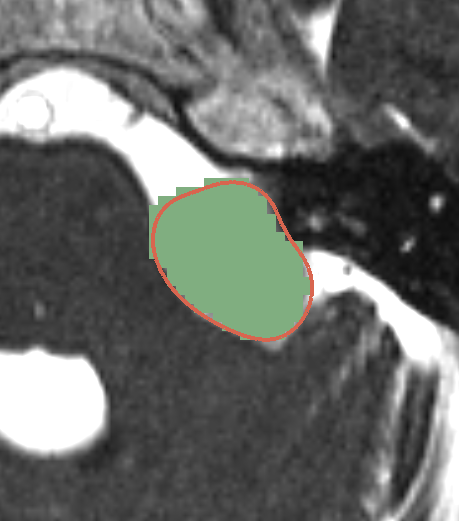
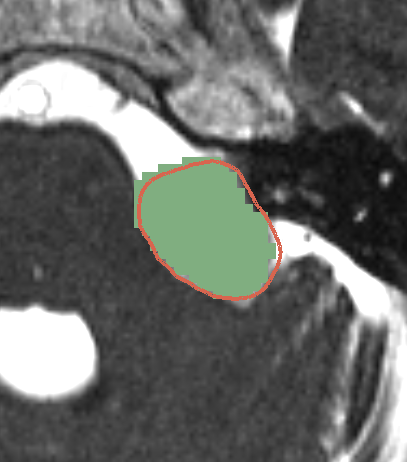
The following image shows a 2D contour generated using the 2D-based conversion algorithm. In green one can perceive the discrete segmentation mask of the NIfTI image that was the conversion’s input and the red contour is the resulting DICOM-RTSS contour.
The following skull 3D reconstruction demonstrates the overlap between the original DICOM data (green) and the converted DICOM-RTSS (red) that was previously converted to NIfTI.
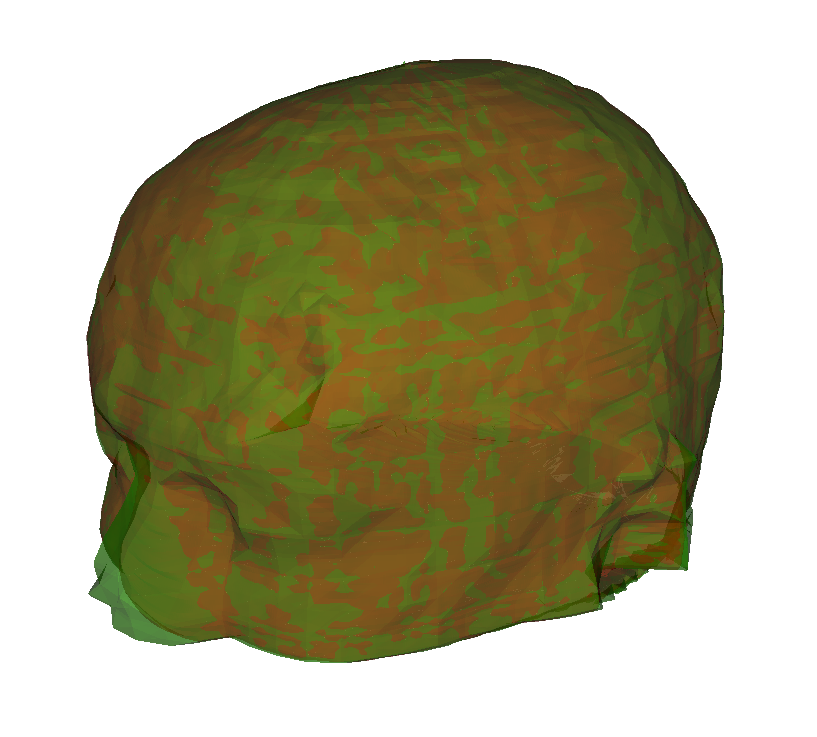
Please note the missing segmentation volume at the nose tip of the subject that was out of the segmentation mask extent. This demonstrates that the 2D-based converter algorithm is feasible to reconstruct the contours even if the segmentation is not completely within the segmentation mask’s extent.
Results Generated with 3D Algorithm#
The following results are generated using the 3D conversion algorithm on the same subject (i.e., VS-SEG-001) as before. Every entity highlighted in green represents the original DICOM-RTSS from the example dataset and all structures in red correspond with the newly converted DICOM-RTSS structures that were generated on basis of an intermediate NIfTI segmentation mask.
The following image shows the same situation as for the 2D-based algorithm. As one can observe the newly converted DICOM-RTSS seems to be larger than the original one. However, our analysis showed that differences between the DICOM-RTSS are in the same range as for the result of the 2D algorithm and that the different appearance is presumably caused due to the higher density of contour points. We assume that the higher density of contour points allow a more accurate display of the result; thus, causing overlapping effects only at very small distances between the both 3D representations.
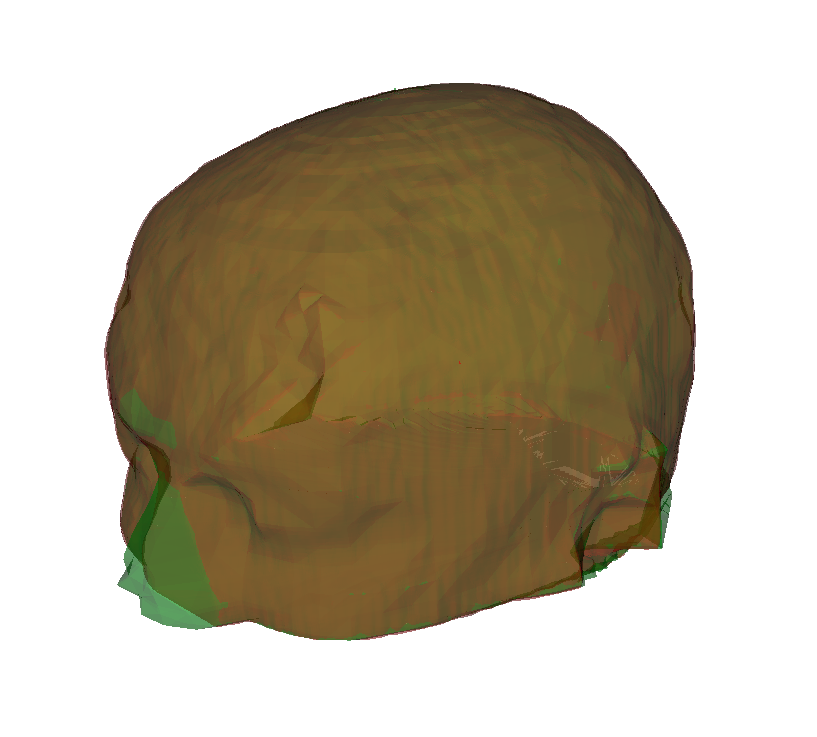
When comparing the contours on the same slice as the result shown for the 2D algorithm, one can not identify major differences for easy structures. However, complex structures seem to generally appear much more natural when generated with the 3D algorithm and compared to results from the 2D algorithm.
Results Metadata#
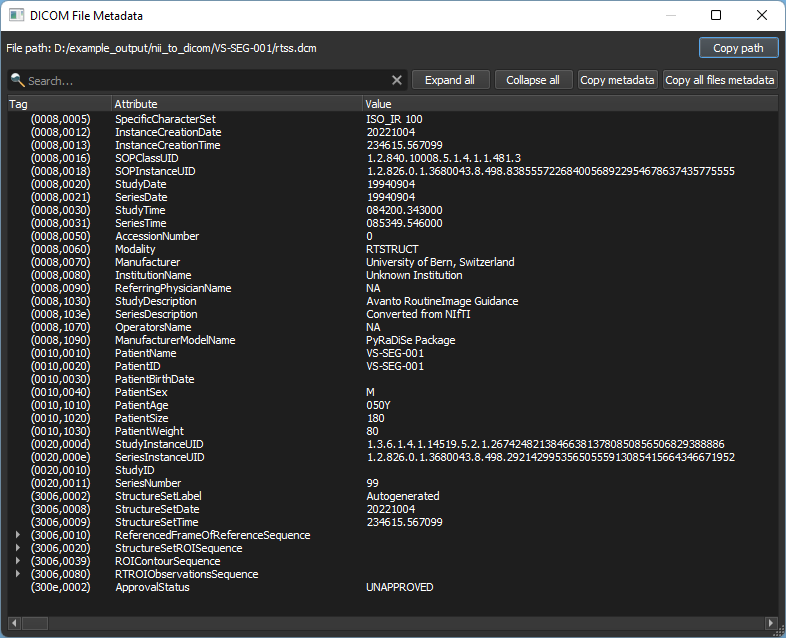
The following figure shows the metadata from the generated DICOM-RTSS files that were modified using a RTSSMetaData instance.