DICOM to NIfTI Conversion#
This example demonstrates the conversion capabilities of PyRaDiSe by converting DICOM data into NIfTI images using the example data provided (details see Examples). However, because the example data comprises two uni-modal DICOM images (i.e., a T1-weighted and a T2-weighted MR image) and the DICOM data only provides minimal information about the modality and the acquisition details, PyRaDiSe is not able to automatically deduce the modality such that it can discriminate between the two images. Resolving this issue requires either a manually adjusted modality configuration file or a user-implemented ModalityExtractor. This example demonstrates both approaches so the reader can understand which approach best fits the current application.
Please note that this issue only arises if the import data comprises at least two uni-modal images. If this is not the case, PyRaDiSe assigns the modality retrieved from the DICOM data to the corresponding images, and the user does not need to take any action.
Import Procedure#
First of all, let’s import the necessary classes for this example.
[1]:
from typing import (Tuple, Optional)

import pyradise.data as ps_data
import pyradise.fileio as ps_io
import pyradise.process as ps_proc
Pipeline Preparation#
Now, let’s prepare the processing pipeline that is applied to each loaded subject. The construction of the pipeline is up to the user and may contain filters implemented by the user. The hereby demonstrated processing pipeline first reorients each image to have RAS (right-anterior-superior) orientation. After reorienting, each image is resampled to have an output size of 256, 256, 256 voxels with unit voxel spacing. In order to ensure that all images possess the same origin and orientation we
use the centering_method 'reference'.
For an overview of the available filters and details about specific filters we refer to the API reference. If you plan to implement new filters we encourage you to study the recommended implementation workflow. Furthermore, if you think that your filter may be of interest for other users, we appreciate your pull request to the PyRaDiSe repository on GitHub.
[2]:
def get_pipeline(output_size: Tuple[int, int, int] = (256, 256, 256),
                 output_spacing: Tuple[float, float, float] = (1.0, 1.0, 1.0),
                 reference_modality: str = 'T1'
                 ) -> ps_proc.FilterPipeline:
    # Create an empty filter pipeline
    pipeline = ps_proc.FilterPipeline()

    # Add an orientation filter to the pipeline
    orientation_params = ps_proc.OrientationFilterParams(output_orientation='RAS')
    pipeline.add_filter(ps_proc.OrientationFilter(), orientation_params)

    # Add a resampling filter to the pipeline
    resample_params = ps_proc.ResampleFilterParams(output_size,
                                                   output_spacing,
                                                   reference_modality=reference_modality,
                                                   centering_method='reference')
    pipeline.add_filter(ps_proc.ResampleFilter(), resample_params)

    return pipeline
Approach 1: Modality Details Retrieval via Modality Configuration File#
Now, we demonstrate the first approach, retrieving the modality and its details using so-called modality configuration files that need to exist for each subject before loading such that the different images are discriminable. Using an appropriate Crawler with corresponding settings allows for the automatic generation of the file skeletons. However, the subsequent adjustment of the file skeletons takes place by the user manually such that each modality configuration file contains no modality
duplicates after modification. Nevertheless, let us go step by step.
First of all adjust the following paths according to your setup. Make sure that the output path is empty, otherwise an error will be raised during execution to hinder data overriding.
[3]:
# The input path pointing to the top-level directory containing the subject directories
input_dataset_path_1 = '//YOUR/PATH/TO/THE/EXAMPLE/DATA/dicom_data/'

# The output path pointing to an empty directory where the output will be saved
output_dataset_path_1 = '//YOUR/PATH/TO/THE/OUTPUT/DIRECTORY/'
Approach 1: Modality Configuration Skeleton Generation#
For the generation of the modality configuration file skeletons, the user instantiates an appropriate Crawler and executes it with write_modality_config=True. The execution of the crawling procedure lets the Crawler search for appropriate DICOM files and extract essential information from the DICOM files to construct the modality configuration file skeletons. Furthermore, the Crawler automatically writes the skeleton files into the corresponding subject folder.
[ ]:
ps_io.DatasetDicomCrawler(input_dataset_path_1, write_modality_config=True).execute()
Approach 1: Manual Modality Configuration Adjustment#
After creating the modality configuration skeletons, the user must manually adjust the "Modality" value for each duplicated DICOM image series (change "UNKNOWN" to a discriminable and informative identifier such as "T1" or "T2").
Example of a Modality Configuration File Skeleton Before Manual Modification
[
    {
        "SOPClassUID": "1.2.840.10008.5.1.4.1.1.4",
        "StudyInstanceUID": "1.3.6.1.4.1.14519.5.2.1.267424821384663813780850856506829388886",
        "SeriesInstanceUID": "1.3.6.1.4.1.14519.5.2.1.149357697745643823053302398129943470751",
        "SeriesDescription": "t1_mpr_tra_gk_v4",
        "SeriesNumber": "2",
        "DICOM_Modality": "MR",
        "Modality": "UNKNOWN"
    },
    {
        "SOPClassUID": "1.2.840.10008.5.1.4.1.1.4",
        "StudyInstanceUID": "1.3.6.1.4.1.14519.5.2.1.267424821384663813780850856506829388886",
        "SeriesInstanceUID": "1.3.6.1.4.1.14519.5.2.1.97824612055862366318560427964793890998",
        "SeriesDescription": "t2_ci3d_tra_1.5mm_v1",
        "SeriesNumber": "4",
        "DICOM_Modality": "MR",
        "Modality": "UNKNOWN"
    }
]
Example of a Modality Configuration File Skeleton After Manual Modification
[
    {
        "SOPClassUID": "1.2.840.10008.5.1.4.1.1.4",
        "StudyInstanceUID": "1.3.6.1.4.1.14519.5.2.1.267424821384663813780850856506829388886",
        "SeriesInstanceUID": "1.3.6.1.4.1.14519.5.2.1.149357697745643823053302398129943470751",
        "SeriesDescription": "t1_mpr_tra_gk_v4",
        "SeriesNumber": "2",
        "DICOM_Modality": "MR",
        "Modality": "T1"
    },
    {
        "SOPClassUID": "1.2.840.10008.5.1.4.1.1.4",
        "StudyInstanceUID": "1.3.6.1.4.1.14519.5.2.1.267424821384663813780850856506829388886",
        "SeriesInstanceUID": "1.3.6.1.4.1.14519.5.2.1.97824612055862366318560427964793890998",
        "SeriesDescription": "t2_ci3d_tra_1.5mm_v1",
        "SeriesNumber": "4",
        "DICOM_Modality": "MR",
        "Modality": "T2"
    }
]
Note:
Please do not change the "DICOM_Modality" key in the JSON-file.
Approach 1: Construct the Conversion Procedure#
Now, all DICOM image series are specified fully, and the data is ready for loading. The following code block describes and demonstrates the loading procedure followed by a simple data pre-processing and a data saving operation in the NIfTI format (default setting of the SubjectWriter).
After execution of the conversion you can check the resulting data with appropriate imaging software (e.g., 3D Slicer)
[5]:
def convert_dicom_to_nifti_with_modality_config(input_path: str,
                                                output_path: str
                                                ) -> None:
    # Instantiate a new loader
    loader = ps_io.SubjectLoader()

    # (optional)
    # Get the filter pipeline
    pipeline = get_pipeline()

    # Instantiate a new writer with default settings
    # Note: You can adjust here the output image file format
    # and the naming of the output files
    writer = ps_io.SubjectWriter()

    # (optional)
    # Instantiate a new selection to exclude additional SeriesInfo entries
    expected_modalities = ('T1', 'T2')
    modality_selection = ps_io.ModalityInfoSelector(expected_modalities)

    # Search DICOM files for each subject and iterate over the crawler
    crawler = ps_io.DatasetDicomCrawler(input_path)
    for series_info in crawler:
        # (optional)
        # Keep just the selected modalities for loading
        # Note: SeriesInfo entries for non-image data get returned unfiltered
        series_info = modality_selection.execute(series_info)

        # Load the subject from the series info
        subject = loader.load(series_info)

        # (optional)
        # Execute the filter pipeline on the subject
        print(f'Processing subject {subject.get_name()}...')
        subject = pipeline.execute(subject)

        # Write each subject to a specific subject directory
        writer.write_to_subject_folder(output_path, subject,
                                       write_transforms=False)


# Execute the conversion procedure (approach 1)
convert_dicom_to_nifti_with_modality_config(input_dataset_path_1,
                                            output_dataset_path_1)
Processing subject VS-SEG-001...
Processing subject VS-SEG-002...
Processing subject VS-SEG-003...
Processing subject VS-SEG-004...
Processing subject VS-SEG-005...
Approach 2: Modality Details Retrieval via ModalityExtractor#
Now, we demonstrate the second approach, retrieving the modality and its details using an implemented ModalityExtractor.
As for the first approach, adjust the following paths according to your setup. Make sure that the output path is empty, otherwise an error will be raised during execution to hinder data overriding.
[6]:
# The input path pointing to the top-level directory containing the subject directories
input_dataset_path_2 = '//YOUR/PATH/TO/THE/EXAMPLE/DATA/dicom_data/'

# The output path pointing to an empty directory where the output will be saved
output_dataset_path_2 = '//YOUR/PATH/TO/THE/OUTPUT/DIRECTORY/'
Approach 2: ModalityExtractor Implementation#
In contrast to the first approach, the modality details are extracted via a set of rules or by accessing a third-party database. Here we use a rule-based approach because the example data encodes the sequence name (i.e., "T1" and "T2") in the series description (SeriesDescription attribute). In order to extract the necessary information, we implement the extract_from_dicom method of the ModalityExtractor. In our implementation, we first define a set of DICOM tags that should
be read from each DICOM file. Those tags are specified in the DICOM standard and are easily retrievable by looking into the DICOM Standard Browser. After defining the necessary DICOM tags, the ModalityExtractor retrieves the requested DICOM attributes from the provided DICOM file specified via its path. Afterward, we implement rules to identify the modalities and return a corresponding Modality instance.
The extract_from_path method is skipped from implementation here because the example data consists exclusively of DICOM files. An implementation of this method is only required for retrieving the modality details of discrete image files (e.g., NIfTI files).
[7]:
class ExampleModalityExtractor(ps_io.ModalityExtractor):

    def extract_from_dicom(self, path: str) -> Optional[ps_data.Modality]:
        # Extract the necessary attributes from the DICOM file
        tags = (ps_io.Tag((0x0008, 0x0060)),  # Modality
                ps_io.Tag((0x0008, 0x103e)))  # Series Description
        dataset_dict = self._load_dicom_attributes(tags, path)

        # Identify the modality rule-based
        modality = dataset_dict.get('Modality', {}).get('value', None)
        series_desc = dataset_dict.get('Series Description', {}).get('value', '')
        if modality == 'MR':
            if 't1' in series_desc.lower():
                return ps_data.Modality('T1')
            elif 't2' in series_desc.lower():
                return ps_data.Modality('T2')
            else:
                return None
        else:
            return None

    def extract_from_path(self, path: str) -> Optional[ps_data.Modality]:
        # We can skip the implementation of this method, because we work
        # exclusively with DICOM files
        return None
Approach 2: Construct the Conversion Procedure#
For creating the pre-loading information (i.e., DicomSeriesInfo), the implemented ModalityExtractor is assigned to the Crawler, which calls it to retrieve the Modality of each DICOM image series. The remaining part of the following code block has already been explained in approach one; thus, we skip repeating ourselves.
After execution of the conversion you can check the resulting data with appropriate imaging software (e.g., 3D Slicer)
[8]:
def convert_dicom_to_nifti_with_modality_extractor(input_path: str,
                                                   output_path: str) -> None:
    # Instantiate a new loader
    loader = ps_io.SubjectLoader()

    # (optional)
    # Get the filter pipeline
    pipeline = get_pipeline()

    # Instantiate a new writer with default settings
    # Note: You can adjust here the output image file format
    # and the naming of the output files
    writer = ps_io.SubjectWriter()

    # (optional)
    # Instantiate a new selection to exclude additional SeriesInfo entries
    expected_modalities = ('T1', 'T2')
    modality_selection = ps_io.ModalityInfoSelector(expected_modalities)

    # Search DICOM files for each subject and iterate over the crawler
    # ATTENTION: If a modality configuration file is contained in the
    # subject directory the modality extractor is ignored. To circumvent
    # this we applied a trick (renaming the modality configuration file name)
    # such that the crawler can not find the modality configuration
    # file (see last code line of the following statement).
    crawler = ps_io.DatasetDicomCrawler(input_path,
                                        modality_extractor=ExampleModalityExtractor(),
                                        modality_config_file_name='x.json')
    for series_info in crawler:
        # (optional)
        # Keep just the selected modalities for loading
        # Note: SeriesInfo entries for non-image data get returned unfiltered
        series_info = modality_selection.execute(series_info)

        # Load the subject from the series info
        subject = loader.load(series_info)

        # (optional)
        # Execute the filter pipeline on the subject
        print(f'Processing subject {subject.get_name()}...')
        subject = pipeline.execute(subject)

        # Write each subject to a specific subject directory
        writer.write_to_subject_folder(output_path, subject,
                                       write_transforms=False)


# Execute the conversion procedure (approach 2)
convert_dicom_to_nifti_with_modality_extractor(input_dataset_path_2,
                                               output_dataset_path_2)
Processing subject VS-SEG-001...
Processing subject VS-SEG-002...
Processing subject VS-SEG-003...
Processing subject VS-SEG-004...
Processing subject VS-SEG-005...
Results#
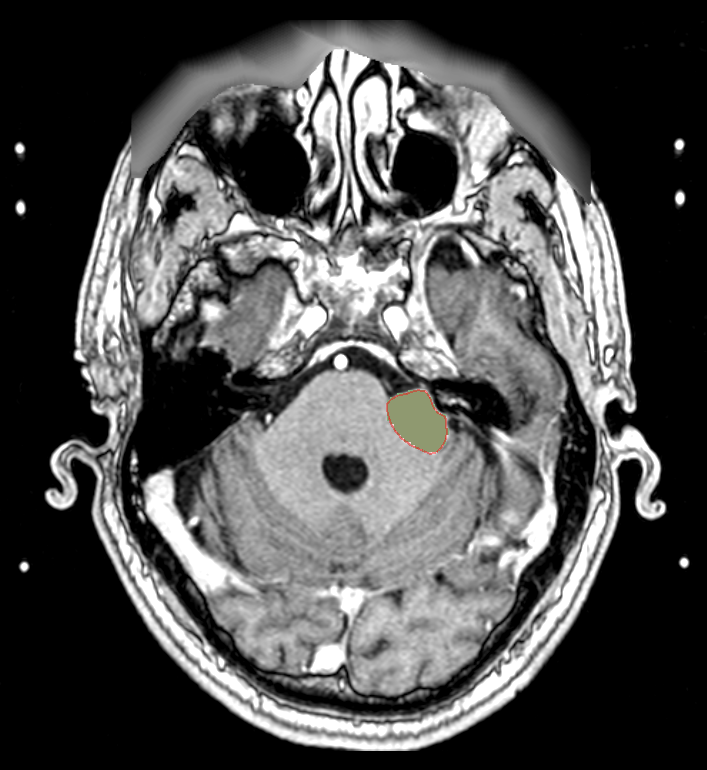
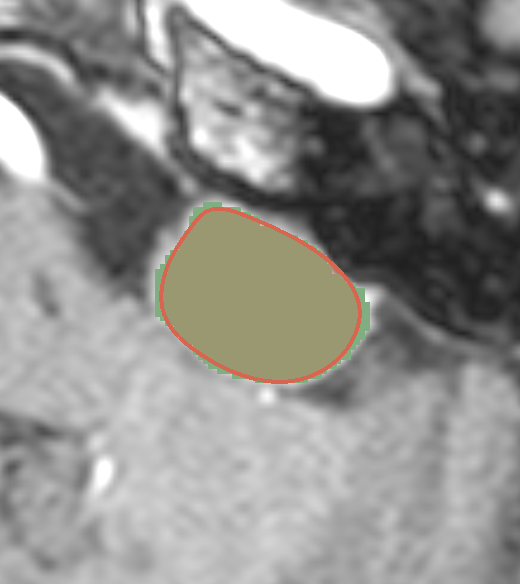
The following images shows overlays of the original DICOM-RTSS target volume (TV, red boundary) from subject VS-SEG-001 with the one converted to NIfTI (green-filled segmentation).