TCIA General Tutorial / Vestibular-Schwannoma SEG Dataset#
The Cancer Imaging Archive (TCIA) is a service which de-identifies and hosts a large publicly available archive of medical images of cancer. TCIA is funded by the Cancer Imaging Program (CIP), a part of the United States National Cancer Institute (NCI), and is managed by the Frederick National Laboratory for Cancer Research (FNLCR).
Currently, the TCIA contains over 180 datasets with public and restricted access. Because most of the datasets possess a standardized file structure converting them with PyRaDiSe is straightforward. The following tutorial demonstrates how to convert a DICOM-based TCIA dataset to the NIfTI format.
Note
The following tutorial presumes that PyRaDiSe is installed. If not, heed the installation section’s
instructions or just run pip install pyradise in the appropriate terminal session.
Download the TCIA Dataset#
TCIA provides the NBIA Data Receiver for downloading datasets. The NBIA Data Receiver can be downloaded here and must be installed prior to downloading any dataset from TCIA.
After installing the NBIA Data Receiver, downloading the chosen dataset from TCIA can take place. For this tutorial, we use the Vestibular-Schwannoma-SEG dataset as a representative example for a TCIA dataset.
Depending on the dataset selection, one may need to request access with TCIA and adopt the following conversion steps slightly to the specific dataset. If running into problems converting other datasets, make sure there is no specific tutorial for this dataset on the PyRaDiSe website providing more elaborate details for conversion. If a tutorial for a specific dataset is missing on the website, contributions via a pull request on GitHub are warmly appreciated.
Note
The Vestibular-Schwannoma-SEG dataset is a public dataset and does not require registration with TCIA.
To download the Vestibular-Schwannoma-SEG dataset, one needs to download the following primary dataset content:
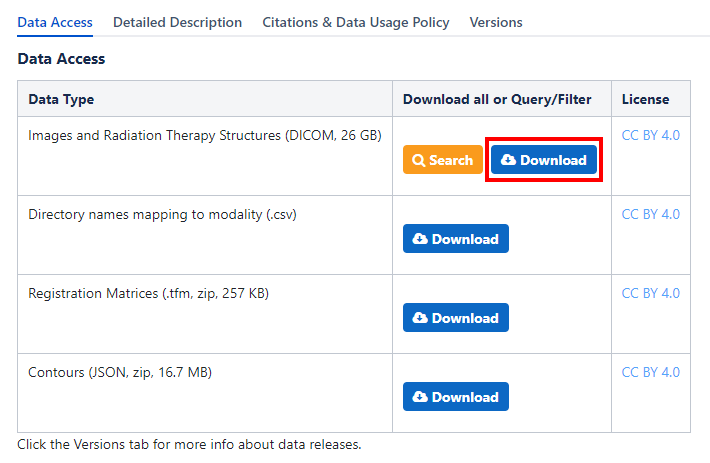
Fig. 1 Screenshot of the Vestibular-Schwannoma-SEG TCIA website download block#
After downloading the NBIA receiver file, one can open it with the installed NBIA Data Receiver to start the downloading procedure.
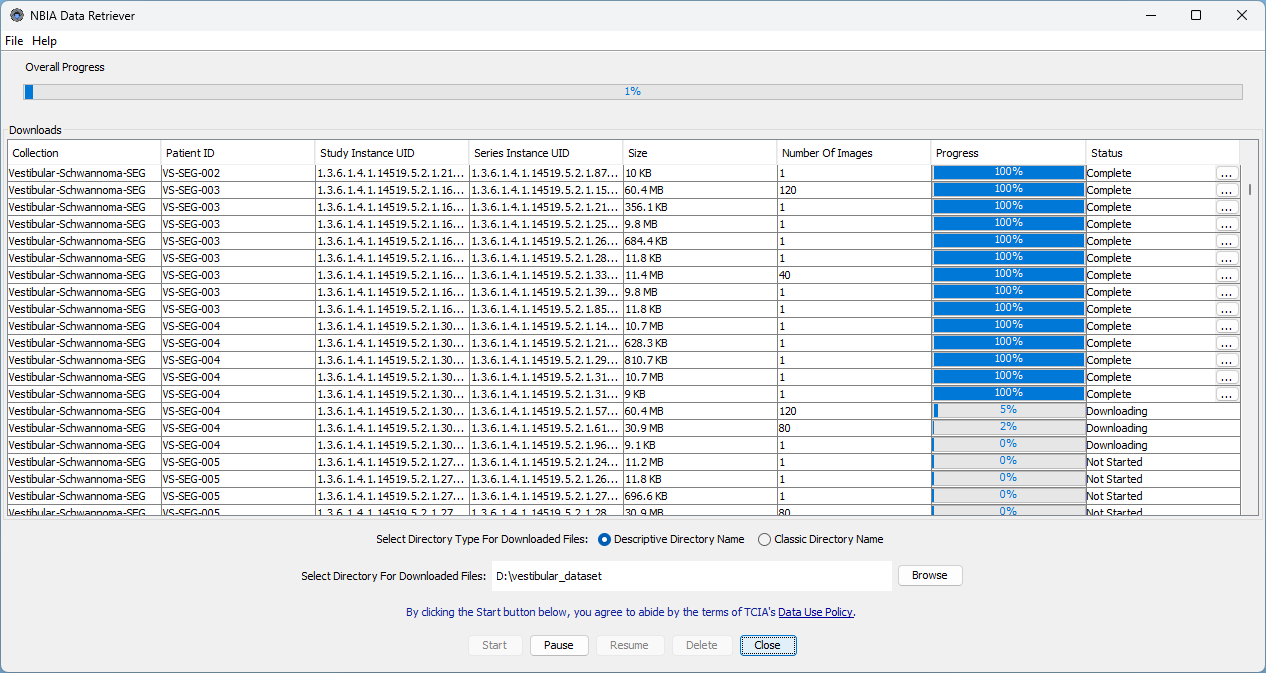
Fig. 2 Screenshot of the NBIA Data Receiver downloading the Vestibular-Schwannoma-SEG dataset#
Note
Be aware that the download procedure may take hours, depending on the dataset size and the internet connection.
After the download procedure is finished successfully, one should have a data folder (i.e., dataset_vestibular) containing the following sub-structure:
dataset_vestibular
└── manifest-1614264588831
    ├── metadata.csv
    └── Vestibular-Schwannoma-SEG
        ├── VS-SEG-001
        │   └── <subject-specific folder structure>
        ├── VS-SEG-002
        │   └── <subject-specific folder structure>
        └── ...
Download Additional Data#
For some datasets, additional data for the conversion is required, such as the registration matrices for aligning the single images. Because this data is specific to the dataset, the steps of this tutorial may need adaptation for specific circumstances.
For the Vestibular-Schwannoma-SEG dataset, the TCIA provides all registration matrices between the T1 and the T2 MR images such that both images are co-registered after applying the registration transformations.
Please download the appropriate files from the TCIA website, unzip them (if applicable), and place them in the data folder (i.e., dataset_vestibular).
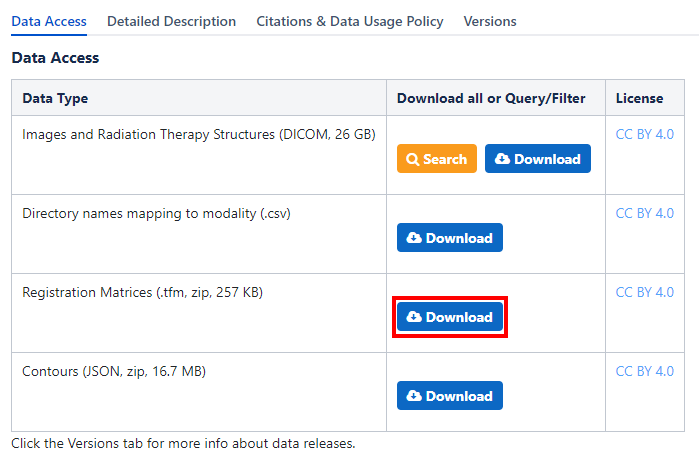
Fig. 3 Screenshot of the additional data to download#
The data structure of the data folder should be as follows:
dataset_vestibular
├── manifest-1614264588831
│   ├── metadata.csv
│   └── Vestibular-Schwannoma-SEG
│       ├── VS-SEG-001
│       │   └── <subject-specific folder structure>
│       ├── VS-SEG-002
│       │   └── <subject-specific folder structure>
│       └── ...
└── registration_matrices
    ├── vs_gk_1_t1
    ├── vs_gk_1_t2
    └── ...
Generating the Modality Configuration Files#
PyRaDiSe provides multiple approaches for identifying (uni-modal) image series in a dataset. Because the conversion of a dataset may be performed multiple times with different pre-processing procedures, using modality configuration files for discriminating image series is best suited. So, the next step is the generation of these modality configuration files for each subject in the dataset. To accomplish this, one needs to write a script reading the content of the metadata.csv file and generating the appropriate modality configuration files.
The following script performs this task for the Vestibular-Schwannoma-SEG dataset and is easily adaptable for other datasets:
import typing as t
import os
import csv

from pyradise.fileio import ModalityConfiguration


class VestibularSchwannomaModalityConfigGenerator:

    def __init__(self, manifest_dir_path: str):
        self.manifest_dir_path = manifest_dir_path

    def _read_meta_data(self) -> t.Dict[str, t.List[t.Dict[str, t.Any]]]:
        # read the meta data csv
        meta_data_path = os.path.join(self.manifest_dir_path, 'metadata.csv')
        with open(meta_data_path, 'r') as f:
            reader = csv.reader(f)
            raw_data_meta_data = list(reader)

        # sort the entries
        data = {}
        header_meta_data = raw_data_meta_data[0]
        for entry in raw_data_meta_data[1:]:
            entry_data = {}

            for identifier, value in zip(header_meta_data, entry):
                entry_data[identifier] = value

            if data.get(entry_data['Subject ID'], None) is None:
                data[entry_data['Subject ID']] = []
            data[entry_data['Subject ID']].append(entry_data)

        return data

    @staticmethod
    def _extract_sequence_info(meta_data: t.Dict[str, t.List[t.Dict[str, t.Any]]]
                               ) -> t.Dict[str, t.List[t.Dict[str, t.Any]]]:
        # extract the sequence info for the MR images
        for subject, entry in meta_data.items():
            for entity_entry in entry:
                if entity_entry.get('SOP Class Name') == 'MR Image Storage':
                    description = entity_entry.get('Series Description')

                    if description.upper().startswith('T1'):
                        entity_entry['AssignedModality'] = 'T1'
                    else:
                        entity_entry['AssignedModality'] = 'T2'

        return meta_data

    def _generate_modality_config(self,
                                  meta_data: t.Dict[str, t.List[t.Dict[str, t.Any]]]
                                  ) -> None:
        # get the subject base directory
        subject_base_path = [folder for folder in os.scandir(self.manifest_dir_path) if folder.is_dir()][0].path

        # get all the subject directories
        subject_paths = [folder for folder in os.scandir(subject_base_path) if folder.is_dir()]

        # loop through the subject directories
        for subject_path in subject_paths:
            print(f'Generating modality config for subject {subject_path.name}...')

            # get the subject-associated metadata
            subject_data = meta_data.get(subject_path.name)

            # build the modality config
            config = ModalityConfiguration()
            for entry in subject_data:

                if entry.get('SOP Class Name') not in ('MR Image Storage', 'CT Image Storage'):
                    continue

                config.add_modality_entry(sop_class_uid=entry.get('SOP Class UID'),
                                          study_instance_uid=entry.get('Study UID'),
                                          series_instance_uid=entry.get('Series UID'),
                                          series_description=entry.get('Series Description'),
                                          series_number='1',
                                          dicom_modality=entry.get('SOP Class Name', ' ').split(' ')[0],
                                          modality=entry.get('AssignedModality'))

            # write the modality config file
            modality_config_path = os.path.join(subject_path.path, 'modality_config.json')
            config.to_file(modality_config_path, True)


    def generate(self) -> None:
        # read the meta data
        print('Reading the meta data file...')
        meta_data = self._read_meta_data()

        # extract the sequence info
        print('Extracting and combining the sequence info...')
        meta_data = self._extract_sequence_info(meta_data)

        # generate the modality config
        print('Generating the modality config files...')
        self._generate_modality_config(meta_data)


if __name__ == '__main__':
    meta_data_path_ = r'PATH_TO_THE_MANIFEST_FOLDER'

    VestibularSchwannomaModalityConfigGenerator(meta_data_path_).generate()
After the modality configuration files are generated, the folder structure should look as follows:
dataset_vestibular
├── manifest-1614264588831
│   ├── metadata.csv
│   └── Vestibular-Schwannoma-SEG
│       ├── VS-SEG-001
│       │   ├── modality_config.json
│       │   └── <subject-specific folder structure>
│       ├── VS-SEG-002
│       │   ├── modality_config.json
│       │   └── <subject-specific folder structure>
│       └── ...
└── registration_matrices
    ├── vs_gk_1_t1
    ├── vs_gk_1_t2
    └── ...
Converting the Dataset#
Now the dataset is prepared for implementing the conversion script. This tutorial demonstrates a minimal conversion procedure that incorporates the co-registration of the intra-subject image series using the downloaded registration matrices. The registration step may be optional for other datasets because the image series are already co-registered. However, other datasets may require incorporating other tasks into the conversion procedure.
Because we demonstrate just a minimal example, further data processing is not shown. However, it can easily be implemented using a filter pipeline performing multiple additional steps, such as image resampling to a fixed size and spacing or image reorientation.
For registration of the two MR sequences, one first needs to implement a registration filter and its corresponding
filter parameter class to apply the downloaded registration transforms to the appropriate MR image. The filter’s
implementation is demonstrated below and stored in a separate file called registration.py:
import typing as t
import warnings

import pyradise.process as proc
import pyradise.data as dat
import SimpleITK as sitk


class RegistrationTransformFilterParams(proc.FilterParams):

    def __init__(self,
                 transforms: t.Dict[str, sitk.Transform],
                 transform_modality: str = 'T1'
                 ) -> None:
        self.transforms = transforms
        self.transform_modality = transform_modality


class RegistrationTransformFilter(proc.Filter):

    @staticmethod
    def is_invertible() -> bool:
        return False

    def execute(self,
                subject: dat.Subject,
                params: t.Optional[RegistrationTransformFilterParams]
                ) -> dat.Subject:
        # transform the corresponding intensity image
        target_image = subject.get_image_by_modality(params.transform_modality)

        if target_image is None:
            warnings.warn(f'No image with modality {params.transform_modality} '
                          f'found in subject {subject.name}.')
            return subject

        # get the transform
        transform = params.transforms.get(target_image.modality.name, None)

        if transform is None:
            warnings.warn(f'No transform found for modality {target_image.modality}')
            return subject

        # transform the image
        image_sitk_pre = target_image.get_image_data()
        min_intensity = float(sitk.GetArrayFromImage(image_sitk_pre).min())
        image_sitk_post = sitk.Resample(image_sitk_pre,
                                        transform,
                                        sitk.sitkBSpline,
                                        min_intensity)

        # track the transform info
        self._register_tracked_data(target_image,
                                    image_sitk_pre,
                                    image_sitk_post,
                                    params,
                                    transform)

        # replace the transformed image to the subject
        target_image.set_image_data(image_sitk_post)

        # check if there are corresponding segmentation images
        series_instance_uid = target_image.get_data_by_key('SeriesInstanceUID')
        for segmentation_image in subject.segmentation_images:
            if segmentation_image.get_data_by_key('SeriesInstanceUID') == series_instance_uid:
                segmentation_sitk_pre = segmentation_image.get_image_data()
                segmentation_sitk_post = sitk.Resample(segmentation_sitk_pre,
                                                       transform,
                                                       sitk.sitkNearestNeighbor,
                                                       0)
                segmentation_image.set_image_data(segmentation_sitk_post)

                # track the transform info
                self._register_tracked_data(segmentation_image,
                                            segmentation_sitk_pre,
                                            segmentation_sitk_post,
                                            params,
                                            transform)

        return subject


    def execute_inverse(self,
                        subject: dat.Subject,
                        transform_info: dat.TransformInfo,
                        target_image: t.Optional[t.Union[dat.SegmentationImage, dat.IntensityImage]] = None
                        ) -> dat.Subject:
        # The registration is invertible. However, because we use this filter only for conversion
        # we do not implement the inverse transform and return the original subject.
        return subject
Because the Vestibular-Schwannoma-SEG dataset contains equivalent DICOM-RT Structure Sets for each MR sequence
separately and only one Structure Set is used for conversion, the other DICOM-RT Structure Set must be excluded from
conversion. To exclude the unnecessary Structure Set before loading, one can implement a specific
SeriesInfoSelector class that removes the corresponding
SeriesInfo entry after crawling.
The following script demonstrates the implementation of such a SeriesInfoSelector
class that is stored in a separate file called selection.py:
import typing as t

import pyradise.fileio as fio


class OnlyT1RTSSSelection(fio.SeriesInfoSelector):

    def execute(self,
                infos: t.Sequence[fio.SeriesInfo]
                ) -> t.Tuple[fio.SeriesInfo, ...]:
        # get the rtss info
        rtss_info = [info for info in infos if isinstance(info, fio.DicomSeriesRTSSInfo)]

        if len(rtss_info) <= 1:
            return tuple(infos)

        # get the series instance uid of the T1 image
        t1_series_instance_uid = None
        for info in infos:
            if isinstance(info, fio.DicomSeriesImageInfo):
                if info.modality.name == 'T1':
                    t1_series_instance_uid = info.series_instance_uid
                    break

        # keep just the rtss info that matches the T1 image series instance uid
        keep_infos = []
        for info in infos:
            if isinstance(info, fio.DicomSeriesRTSSInfo):
                if info.referenced_instance_uid == t1_series_instance_uid:
                    keep_infos.append(info)
            else:
                keep_infos.append(info)

        return tuple(keep_infos)
After implementing the antecedent two functionalities (i.e., registration functionality and selection functionalities), one can implement the conversion procedure. This procedure incorporates the previously implemented functionalities into the main conversion script by importing them. The conversion procedure is demonstrated below and can be adapted straightforwardly if one wants to incorporate more advanced processing steps:
import os
import typing as t

import pyradise.fileio as fio
import SimpleITK as sitk

from selection import OnlyT1RTSSSelection
from registration import RegistrationTransformFilter, RegistrationTransformFilterParams


def read_transforms(transform_dir: str,
                    subject_name: str
                    ) -> t.Dict[str, sitk.Transform]:
    # get the subject index because the registration matrices
    # are named differently
    subject_idx = int(subject_name.split('-')[2])

    # search for all directories matching the subject index
    transform_dir_name_prototype = f'vs_gk_{subject_idx}_'
    transform_dir_names = [dir_name for dir_name in os.scandir(transform_dir)
                           if dir_name.name.startswith(transform_dir_name_prototype)]

    # read the transforms
    transforms = {}
    for dir_name in transform_dir_names:
        # get the transform files
        transform_files = [file for file in os.scandir(dir_name) if file.is_file()]

        for transform_file in transform_files:
            # read the transform
            transform = sitk.ReadTransform(transform_file.path)
            target_image = dir_name.name.split('_')[-1].upper()
            transforms.update({target_image: transform})

    return transforms


def main(input_dir: str,
         transform_dir: str,
         output_dir: str
         ) -> None:
    # get the subject list
    subjects = [subject for subject in os.scandir(input_dir) if subject.is_dir()]

    # loop through the subjects
    for i, subject in enumerate(subjects):
        print(f'[{i} / {len(subjects)}] Processing subject {subject.name}...')

        # crawl for the subject data
        crawler = fio.SubjectDicomCrawler(subject.path)
        series_info = crawler.execute()

        # just keep the T1 RTSS
        series_info = OnlyT1RTSSSelection().execute(series_info)

        # load subject
        subject = fio.SubjectLoader().load(series_info)

        # load the registration transforms
        transforms = read_transforms(transform_dir, subject.name)

        # apply the registration transforms
        registration_params = RegistrationTransformFilterParams(transforms, 'T2')
        registration_filter = RegistrationTransformFilter()
        subject = registration_filter.execute(subject, registration_params)

        # add a filter pipeline for adjusting the data properties,
        # such as image size, spacing, orientation, etc.

        # write the subject to nifti
        writer = fio.SubjectWriter()
        writer.write_to_subject_folder(output_dir, subject, True)


if __name__ == '__main__':
    input_path = r'PATH_TO_THE_FOLDER_CONTAINING_THE_SUBJECTS'
    transform_dir_path = r'PATH_TO_THE_REGISTRATION_MATRICES'
    output_path = r'PATH_TO_AN_EMPTY_OUTPUT_FOLDER'

    main(input_path, transform_dir_path, output_path)
Now the conversion procedure can be started. Be aware that this procedure may take much time to finish depending on the machine it is running on and the additional steps which may be added.
After the script has finished, all subjects should have been converted to NIfTI files in the specified output folder. The structure of the output folder should be as follows:
converted_vestibular
├── VS-SEG-001
│   ├── img_VS-SEG-001_T1.nii.gz
│   ├── img_VS-SEG-001_T2.nii.gz
│   ├── seg_VS-SEG-001_NA_Cochlea.nii.gz
│   ├── seg_VS-SEG-001_NA_Skull.nii.gz
│   ├── seg_VS-SEG-001_NA_TV.nii.gz
│   └── ...
├── VS-SEG-002
│   ├── img_VS-SEG-002_T1.nii.gz
│   ├── img_VS-SEG-002_T2.nii.gz
│   ├── seg_VS-SEG-002_NA_cochlea.nii.gz
│   ├── seg_VS-SEG-002_NA_Skull.nii.gz
│   ├── seg_VS-SEG-002_NA_TV.nii.gz
│   └── ...
└── ...
Congratulations :) You have successfully converted the Vestibular-Segmentation-SEG dataset to NIfTI files!